DataBeat · Michele Ibba

Volca Studio XL

Prepare sample kits for the original Volca Sample

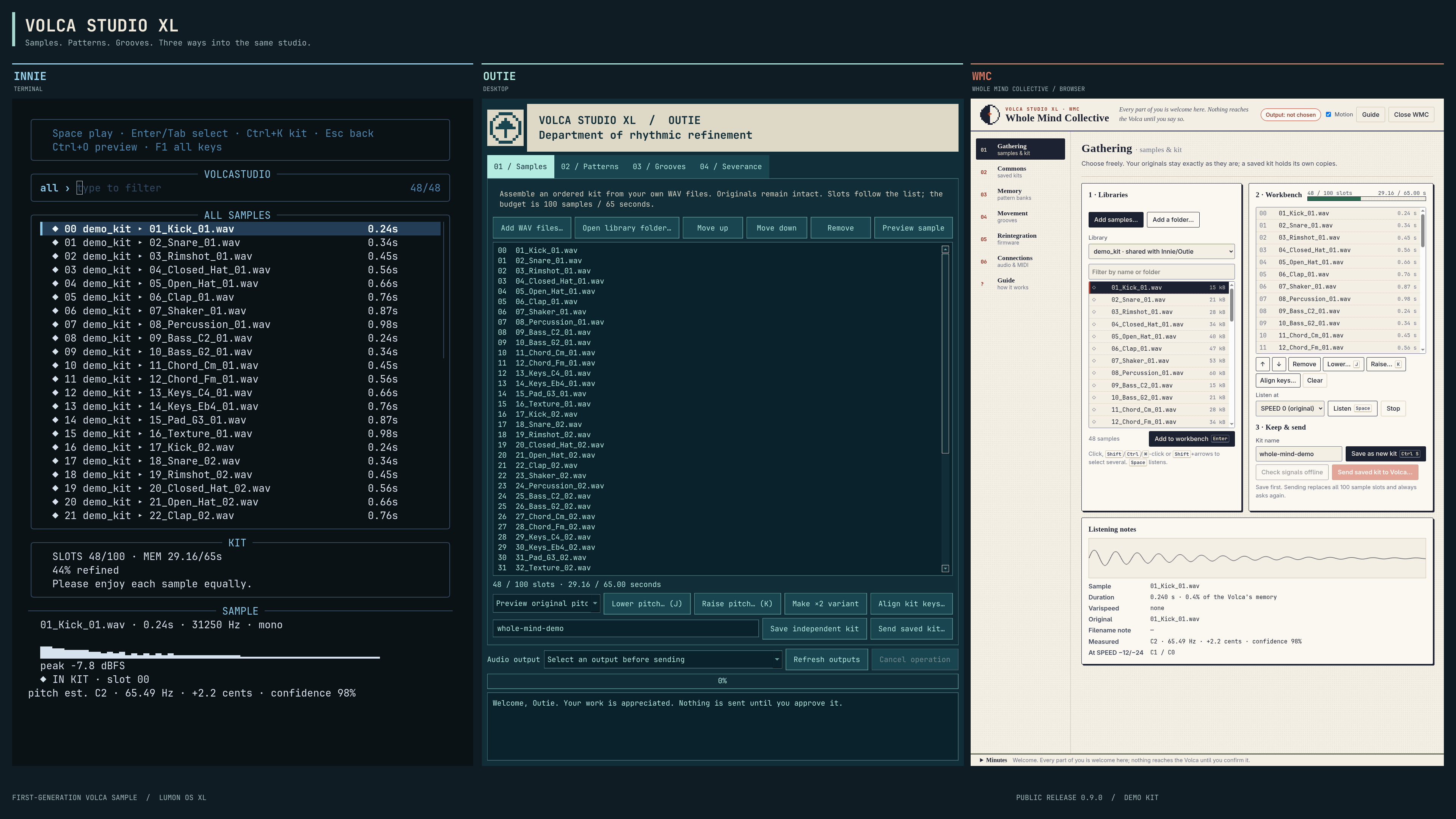
Volca Studio XL prepares and transfers sample kits, patterns, grooves and LUMON OS XL firmware. On Linux it comes in three editions: WMC (Whole Mind Collective, opens in Google Chrome), Outie (desktop) and Innie (terminal). On macOS and Windows: WMC and Outie.

Not sure which one to pick? Start with WMC: you download it, open it, and it works in Google Chrome, with nothing to set up. It’s the easiest way in.

Innie, Outie and WMC with the same demo kit
Innie, Outie and WMC · real interfaces, one demo kit.

Three steps

  1. DownloadThe button suggests a package for your operating system. Check the architecture and requirements; all packages are listed below.
  2. OpenOpen the downloaded file, then open “Volca Studio WMC”.
  3. WorkThe local helper opens WMC in Chrome. Add samples, save a kit, then review the transfer before sending.

In Volca Studio XL

LUMON OS XL v1.0.2

Studio contains no firmware. Download the official Korg volca sample 1.42 updater from korg.com and add it in Reintegration (WMC), Severance (Outie) or Firmware (Innie). Studio builds LUMON OS XL v1.0.2 from it on your computer, checks the result and keeps the Korg updater to restore Korg’s firmware.

Firmware guide

270 groove templates

MPC3000, Dilla-inspired instrument grids, analytical swings and D’Angelo selections: templates that change timing in LUMON OS XL patterns. The catalog contains timing values, without source audio or MIDI files.

Application and firmware licences

Volca Studio XL is MIT-licensed. The Korg SYRO encoder keeps Korg’s BSD-3-Clause license. Studio contains no Korg firmware: you supply the Korg updater yourself, under Korg’s licence.

All versions and release notes

Three editions, one studio

WMC

A locally installed application that opens in Google Chrome. Windows x64, macOS on Apple silicon, Linux x86-64. Chrome is installed separately.

Outie

Native desktop application. Windows x64, macOS on Apple silicon, Linux x86-64.

Innie

Keyboard-driven terminal application for Linux, installed from the source package.

All three share libraries, kits, pattern banks and firmware on the same computer. WMC keeps separate audio and MIDI device choices.

You need

  • Google Chrome (free: google.com/chrome).
  • An original Volca Sample and a 3.5 mm cable: computer audio out → Volca SYNC IN.
  • For pattern backups only: a USB-MIDI interface → Volca MIDI IN, and a cable from the Volca headphone output → computer input.

Why a download?

WMC opens a local workspace in Chrome. The included helper prepares your files and connects to the audio and MIDI devices you choose. No terminal, Python installation or account is needed.

All downloads

EditionSystemFileSHA-256
The download list is unavailable or loading. Use All versions and release notes for packages.

All versions and release notes / Tutte le versioni e le note di rilascio

Step-by-step guide (no terminal needed)